

If you’ve spent any time learning about AI, you’ve probably come across the terms RAG, embeddings, and vector databases. These three technologies are closely connected, and understanding how they work together gives you a useful foundation for understanding how modern AI applications can work with information beyond an LLM’s original training data.
In this guide, we’ll break down each concept and look at how they fit together.
The context
Large language models (LLMs) are good at generating natural-sounding answers. But they have limitations.
For example, imagine a company has an internal knowledge base containing thousands of documents about its products, processes and policies. You could ask an LLM a question about those documents, but the model won’t automatically have access to that private information. You could try putting all the documents into the prompt, but that quickly becomes impractical. There may be too much information, and sending large amounts of text with every request can be expensive and slow.
We need a way to:
1. Find the information relevant to a user’s question.
2. Give that information to the LLM.
3. Let the LLM use it to generate an answer.
That’s where RAG comes in.
What is RAG?
RAG stands for Retrieval-Augmented Generation. The name describes exactly what it does:
- Retrieval: find relevant information from an external source.
- Augmented: add that information to the context given to the AI model.
- Generation: use the model to generate an answer.
A simplified RAG system looks something like this:
User question ➔ Find relevant information ➔ Retrieved documents ➔ LLM + retrieved information ➔ Generated answer
Imagine you ask an internal company chatbot: “How many days of annual leave do I get?” The system could search the company’s HR documentation, find the relevant section, and provide it to the LLM. The LLM then uses that information to produce a useful response.
The important point is that the LLM isn’t expected to memorise the company’s HR policies. The application retrieves the relevant information when it needs it.
This makes RAG useful for applications such as:
- Internal company knowledge assistants
- Customer support chatbots
- Document search
- AI assistants connected to private data
- Question-answering systems
RAG is also a useful example of where data engineering and AI overlap: you need to collect, process and retrieve data before the AI model can make use of it.
But how does the system know which documents are relevant? This is where we bring in embeddings.
What are embeddings?
An embedding is a numerical representation of some data. For AI applications, embeddings are often used to represent pieces of text as lists of numbers, sometimes called vectors.
For example, a sentence might be converted into something conceptually like: [0.12, -0.43, 0.87, 0.21, …] (Though real embeddings typically contain many more numbers than this example.)
The important thing isn’t the individual numbers, but the relationship between vectors. Text with similar meanings should produce embeddings that are relatively close together in vector space.
For example:
“I need to book a holiday”
“I want to arrange some time off”
These sentences use different words, but their meanings are similar. Their embeddings should therefore be relatively close.
On the other hand:
“I need to book a holiday”
“The server returned a 500 error”
have very different meanings, so their embeddings should be further apart.
This gives us a way to search by meaning, rather than only by matching exact words. A traditional keyword search might struggle with “How much time can I take away from work?” if the relevant document says “Employees are entitled to 25 days of annual leave.” This is because the words themselves don’t match particularly well.
A semantic search system using embeddings can recognise that the two pieces of text are related in meaning. That makes embeddings particularly useful for RAG.
What is a vector database?
Now we’ve converted our documents into vectors. We need somewhere to store them and search through them efficiently. That’s the job of a vector database. It’s designed to store and retrieve vector representations of data.
Instead of asking “Does this document contain the exact word ‘holiday’?”, we can ask something closer to: “Which stored vectors are most similar to the vector representing this question?”
The database can then return the most relevant pieces of information.
A simplified setup might look like this:
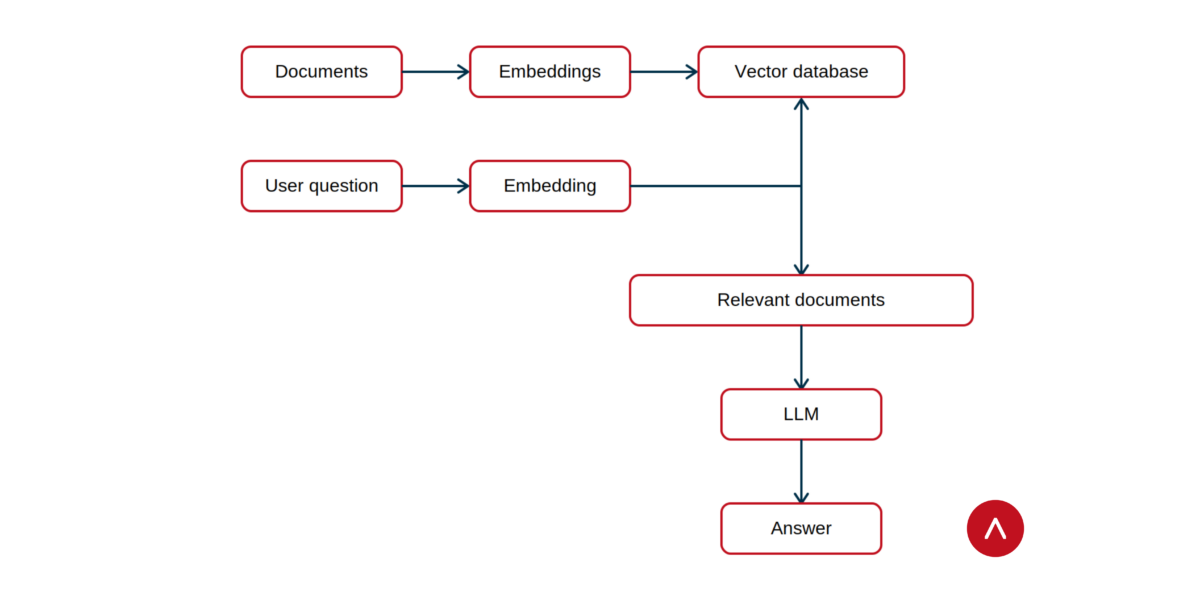
Company documents ➔ Split into smaller chunks ➔ Create embeddings ➔ Store embeddings + original text ➔ Vector database
When someone asks a question, the process works in reverse:
User question ➔ Create an embedding ➔ Search vector database ➔ Find similar document chunks ➔ Send them to the LLM ➔ Generate an answer
This is the basic architecture behind many RAG applications.
How RAG, embeddings and vector databases work together
To sum up, the three concepts have different jobs:
Embeddings turn information into vectors that capture meaning. They make it possible to compare pieces of information based on semantic similarity.
Vector databases store and search those vectors. They make it practical to find the information that is most relevant to a query.
RAG uses retrieved information from vector databases to improve an AI-generated response.
Put together, they form a pipeline. Here’s a simplified visualisation:
Why are these concepts useful for developers?
RAG is a good example of why building AI applications isn’t just about calling an LLM API. A useful AI system can involve Python, APIs, databases, data pipelines, Cloud infrastructure, machine learning models, embeddings, application logic, and more. In other words, there’s plenty of software engineering and data engineering involved.
You don’t need to understand every part of the AI ecosystem before you can start learning. But understanding how these components connect gives you a much stronger foundation for building practical applications.
If you’re new to AI, start with the underlying concepts: Learn some Python. Understand how databases and APIs work. Get comfortable manipulating data. Then start experimenting with machine learning and LLMs. From there, embeddings and RAG become much easier to understand because you can see the engineering problem they’re solving.
If you want to build those skills through practical projects, Northcoders’ Data Engineering, AI & Machine Learning Bootcamp covers Python, SQL, data engineering, cloud engineering, AI and machine learning. The course includes practical experience with LLMs and embeddings, and students build their own RAG-powered AI system. Click here to learn more.